
CAREER ARTICLE · 31 OCTOBER 2026
A step-by-step way to set up a clear, honest LinkedIn profile as a first-time job seeker in Odisha, with made-up examples, fixes for common problems, and a straight answer on how much it matters.
If you are a fresher, set up one LinkedIn profile that repeats the facts on your resume: a plain photo, a headline that says the job you want and where, a short About section, your education, and skills you can really show. It takes about an hour. Follow the steps below in order.
Cover design: Digi Jasmine. The profile card is a sketch, not a real person.
The short answer
A LinkedIn profile can help people find you. It is not a rule for getting a job, and it does not replace a good resume. Set it up once, keep it true, and use the same facts as your resume.
How important is it for a candidate?
It helps, but how much depends on the job and the employer. Treat it as an extra, not a replacement for how a job asks you to apply.
LinkedIn describes your profile as a professional landing page. A clear, complete profile gives recruiters and other people a place to find you, and shows more about you than a one-page resume can.
It does not promise views, interviews or a job. LinkedIn says people search results are personal to each searcher and have no single fixed order, so nobody can promise you a position.
Some employers ask for a LinkedIn link or take applications there. Many ask for a resume by email, a form, a portal or an exam application. A LinkedIn profile does not replace those. Read each job notice and do what it says.
Our judgment, not a measured fact: office, IT and remote roles, internships, and people applying outside their own city are more likely to be looked up online. For exam-based government jobs and phone or walk-in roles, the official application matters first.

Before you start: gather five things
- Your finished resume, open next to LinkedIn. Copy facts from it, never the other way round.
- A clear photo of your face in good light, with a plain background. A passport-style or shoulders-up photo is fine.
- The job you want, in a few words, for example “accounts assistant” or “junior web developer”.
- The cities and districts where you can work, for example Bhubaneswar, Cuttack or remote.
- A short list of skills you can show in an interview.
What goes where on your profile
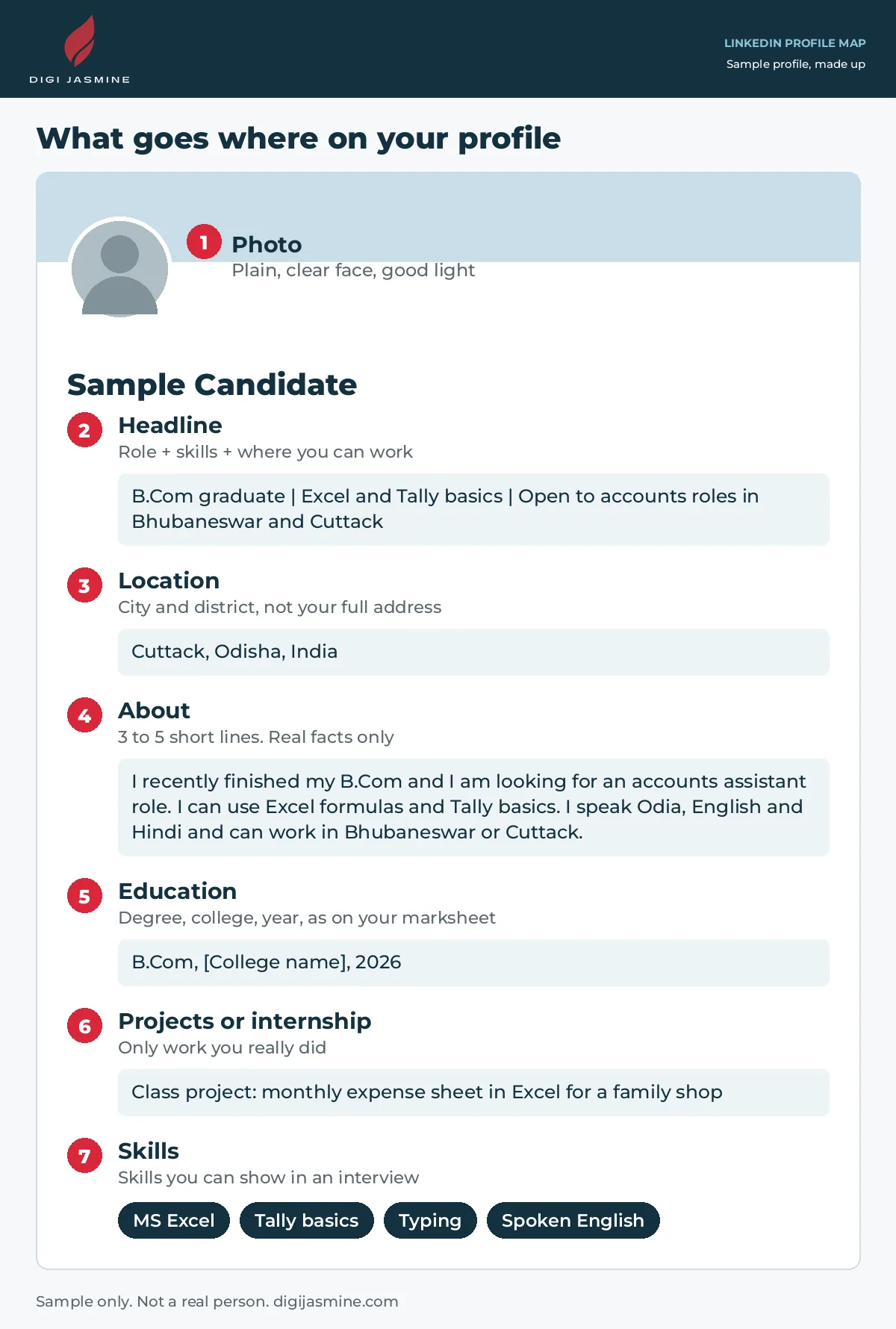
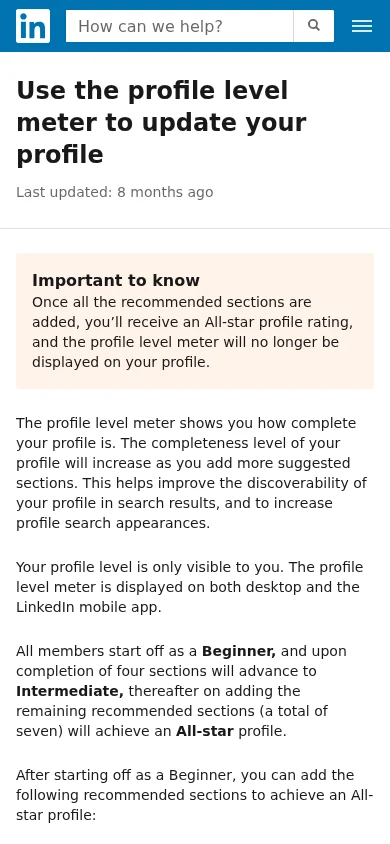
LinkedIn counts a profile as “All-star” once the recommended sections are added: photo, location, industry, education, position, skills and summary. That meter is only visible to you. Use it as a checklist, not a score to chase.
Step-by-step setup
Open your LinkedIn profile, then work down this list. To change any section, use the Edit (pencil) icon beside it. On a computer: click the Me icon at the top of your LinkedIn home page, then your Profile card. On a phone: tap your profile photo, then your Profile card. LinkedIn notes that some sections cannot be edited in a mobile browser, so use the app if one is missing (LinkedIn Help: edit your profile).
Step 1Use your real name and a plain photo
5 minutes
Put only your first and last name in the name fields. LinkedIn says extra words in the name field are not allowed, so keep slogans and job titles out of it. Add a clear, recent photo of your face.
Check: would a recruiter recognise you from this photo at an interview? If yes, keep it.
Step 2Write a headline that says the job you want and where
10 minutes
Your headline is the line under your name. Use it for three things: who you are now, one or two skills, and the work you want. Say where you can work. In Odisha many openings are tied to a city, so a location helps.
B.Com graduate | Excel and Tally basics | Open to accounts roles in Bhubaneswar and Cuttack
BCA final-year student | HTML, CSS and basic JavaScript | Looking for a junior web role or internship, Bhubaneswar or remote
Graduate | Odia, English and Hindi | Looking for customer support or office roles in Sambalpur or remote
Step 3Set your location
2 minutes
Add your city and district, for example “Cuttack, Odisha, India”. Do not put your full home address on a public profile.
Step 4Write a short About section
15 minutes
Write three to five short lines in your own words. Say what you studied, what job you want, what you can do, which languages you speak, and where you can work. Use real facts only.
I recently finished my B.Com and I am looking for an accounts assistant role. I can use Excel formulas and Tally basics. I speak Odia, English and Hindi and can work in Bhubaneswar or Cuttack. I am happy to start with an internship.
Saying where you can work and which languages you speak is useful in Odisha because many openings are tied to a city.
Step 5Add your education
5 minutes
Add your degree, college and years, the same as on your marksheet and resume. If a name or date differs from your certificates, fix it here and on the resume.

Step 6Add projects, an internship or training you really did
10 minutes
Copy the project or internship lines from your resume. Use the Add profile section button in your introduction section to add a missing section. A class project is fine if you call it a class project. If you have none yet, leave the section out. Do not invent work.
Step 7Add skills you can show
5 minutes
- On a computer, click the Me icon, then View Profile. Click Add profile section in your introduction section.
- Click Core, then choose Add skills.
- Type a skill and pick it from the list that appears, or choose one under Suggested based on your profile.
- Click Save. Repeat for each skill.
On a phone: tap your profile picture, tap View profile, tap Add section, choose Core, then Add skills. LinkedIn allows up to 100 skills, but a short list of skills you can really show works better than a long one (LinkedIn Help: add and remove skills).
Step 8Make a simple public profile link
3 minutes
- Click the Me icon, then your Profile card.
- Click the Edit icon next to Public profile & URL on the right side.
- Under Edit your custom URL, click the Edit icon beside your profile URL.
- Type the last part of the new link, for example your name, then click Save.
LinkedIn hands out custom URLs on a first-come, first-served basis, and you can have only one at a time. Your link is easy to put on your resume (LinkedIn Help: manage your public profile URL).
Step 9Check what the public can see
3 minutes
Your public profile settings control which parts people who are not signed in to LinkedIn can see. Click the Me icon, then View Profile, then the Edit icon next to Public profile & URL. You can switch the whole public profile off, or switch off individual items. Changes save automatically. LinkedIn says search engines like Google can take weeks or months to show changes (LinkedIn Help: control your public profile).
We suggest keeping your phone number and email off the public page, because anyone can read it. This is common-sense advice, not a LinkedIn rule.
Step 10Decide if you want to use Open to Work
5 minutes
Open to Work is optional. LinkedIn says it lets you share the types of job and preferred location, and that this can help your profile show up when recruiters search. You choose who sees it. The choices include all LinkedIn members, recruiters only, or only you. Sharing with all members adds an #OpenToWork photo frame to your profile photo. In India you can also add notice period and expected salary. LinkedIn says that information is visible to recruiters only, and you are not forced to fill it in (LinkedIn Help: Open to Work).
To start: click the Me icon, click your Profile card, click Open to, then Finding a new job.
Step 11Read it once, then ask someone else to read it
10 minutes
- Compare your profile with your resume: names, dates, marks and skills must match.
- Ask a friend or teacher to check spelling and facts.
- Open your profile in a private or signed-out window to see what a stranger sees.
Common problems and fixes
I have no experience to add
Add education, class projects, training or volunteering that you really did, and say what it is. Skills and languages count. Never invent a job.
My headline sounds too general
Name the job you want, add one or two skills, and add your city. “Graduate | Excel | Accounts roles, Cuttack” says more than “Hardworking fresher”.
A section is missing when I edit on my phone
LinkedIn says not every section can be edited in a mobile browser. Use the LinkedIn app, or finish that section on a computer.
The profile link I want is taken
Custom links are first come, first served. Try your full name with a short word, such as your skill or city, and save the one that is free.
Google still shows my old profile
LinkedIn says search engines can take several weeks or months to show changes, and LinkedIn does not control that. Your public profile settings decide what may appear.
I do not know how I show up in search
LinkedIn says people search results are personal to each searcher and there is no single correct order, so your result can look different to different people. Do not chase a rank. Keep your profile clear and accurate.
An employer asked for my resume, not my LinkedIn
Send what the notice asks for, in the way it asks. LinkedIn is an extra.
Mistakes to avoid
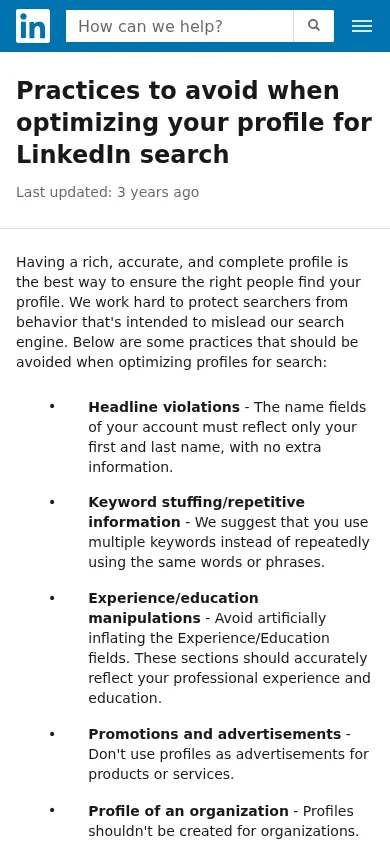
- Stuffing the headline with the same keyword again and again. LinkedIn says to avoid keyword stuffing.
- Inflating your experience or education. LinkedIn says these fields should be accurate.
- Using your profile as an advertisement. LinkedIn says not to.
- Putting anything in the name field except your name.
- Skills, marks or dates that differ from your resume.
- Copying a sample line as it is. Recruiters can tell.
Frequently asked questions
Do I need a LinkedIn profile as a fresher?
It depends on the job and the employer. Some notices ask for a LinkedIn link, many ask for an email, a form, a portal or an exam application. LinkedIn does not replace those. Follow each notice, and treat the profile as an extra.
I have no work experience. What do I put on my profile?
Use what is real: your education, class projects, an internship, training, volunteering, skills and languages. Say clearly what each one is. Never invent a job.
Should I write my profile in English, Odia or Hindi?
Most job notices are in English, so a simple English headline and About section is the safest choice for most freshers. This is our advice, not a LinkedIn rule. Use short sentences and plain words.
Should I put my phone number and home address on it?
Only add what you are happy for others to see. Your location can be just your city and district, for example Cuttack, Odisha. Keep your full address off the profile.
Can I copy the text from my resume?
Use the same facts, so that your marks, dates and skills match. The About section reads better as three to five short lines in first person than as a pasted resume.
Will switching on Open to Work get me a job?
No. It is an optional setting, and nothing can promise views, interviews or jobs. Switch it on only if you are comfortable with it, and read what LinkedIn says about who can see it first.
My profile does not show up when I search for myself. Is it broken?
Not necessarily. LinkedIn says search results are personal to each searcher and have no single fixed order. Check that your profile is public (Step 9), that your name field has only your name, and that your headline and skills are filled in. Do not stuff keywords, since LinkedIn lists that as a practice to avoid.
Do I have to pay for anything to follow this article?
The steps in this article are for a regular profile. You can follow all eleven without paying anyone.
What to do next
- Finish your resume first with our resume article for freshers in Odisha.
- Work through steps 1 to 11 above in one sitting.
- Add your LinkedIn link to your resume contact line.
- Check your resume against our Resume Checklist. It is a basic checklist, not an ATS score.
- If you would like help with your resume or profile text, see the Resume, CV and Personal Branding service.
Want help with your resume or LinkedIn profile?
Digi Jasmine offers resume, CV and LinkedIn support for job seekers. If you would rather not do it alone, this is what the Resume, CV and Personal Branding service page lists:
- Resume and CV design, written and formatted for your qualifications and career goals.
- ATS-conscious formatting: clean, structured layouts that are easy to read.
- LinkedIn profile optimization: headline, About section, and experience and skills lined up with your resume.
- A Career Branding Bundle that puts the resume and LinkedIn profile together.
After you enquire, the scope, deliverables and timeline are confirmed before work starts. No service can promise a job or an interview. Packages and current prices are on the service page.
Sources
- LinkedIn Help: create a good LinkedIn profile
- LinkedIn Help: use the profile level meter
- LinkedIn Help: edit your profile
- LinkedIn Help: add and remove skills
- LinkedIn Help: manage your public profile URL
- LinkedIn Help: control your public LinkedIn profile
- LinkedIn Help: let recruiters know you are Open to Work
- LinkedIn Help: search relevance for people search
- LinkedIn Help: practices to avoid when optimizing your profile for LinkedIn search
LinkedIn Help pages were read on 31 October 2026. The three screenshot excerpts are unedited captures of those pages, owned by LinkedIn and shown for explanation. LinkedIn menus change, so follow the current screen if a button looks different. Advice marked as ours is editorial judgment; the LinkedIn Help pages are the reference.